
Setting Up Autopay for an Elderly Parent: Pros and Cons
Should your elderly parent use autopay? Which bills suit it, the overdraft risk, bank alerts, and a monthly review that keeps your family in the loop.
Autopay can be a good fit for an elderly parent's steady monthly bills. It helps keep them on time, even in a week when the mail piles up. It works best with three things in place: the right bills chosen, enough money in the account, and someone (your parent, you, or both) looking at the statement each month. Here is how to decide, and how to set it up together.
Should your elderly parent use autopay?
For many older adults, the answer is "for some bills, yes." AARP's guide to paying bills automatically lists the main benefits: payments arrive on time, late fees are less likely, and there are fewer paper checks to write and mail. It also points out that automatic payments can help when memory problems are starting, because a missed bill can go unnoticed.
Autopay has limits too, and they matter just as much:
- It doesn't read the bill. A wrong charge gets paid as easily as a right one. AARP's advice is plain: "But still take the time to review your monthly statements to make sure there are no fraudulent charges."
- The money has to be there. AARP also says to "keep an eye on the balance so you know there's enough money to cover the payment amounts."
- Old charges keep running. A subscription or service your parent no longer uses can go on being paid quietly, month after month.
It is your parent's account and your parent's choice. Set it up together, and let them keep paying by hand any bills they like handling themselves. Some people enjoy writing the check to their church or their newspaper, and that is fine.
Which bills are a good fit for autopay, and which should you review first?
A simple rule: automate what is steady, look at what changes, and put the once-a-year bills on a calendar.
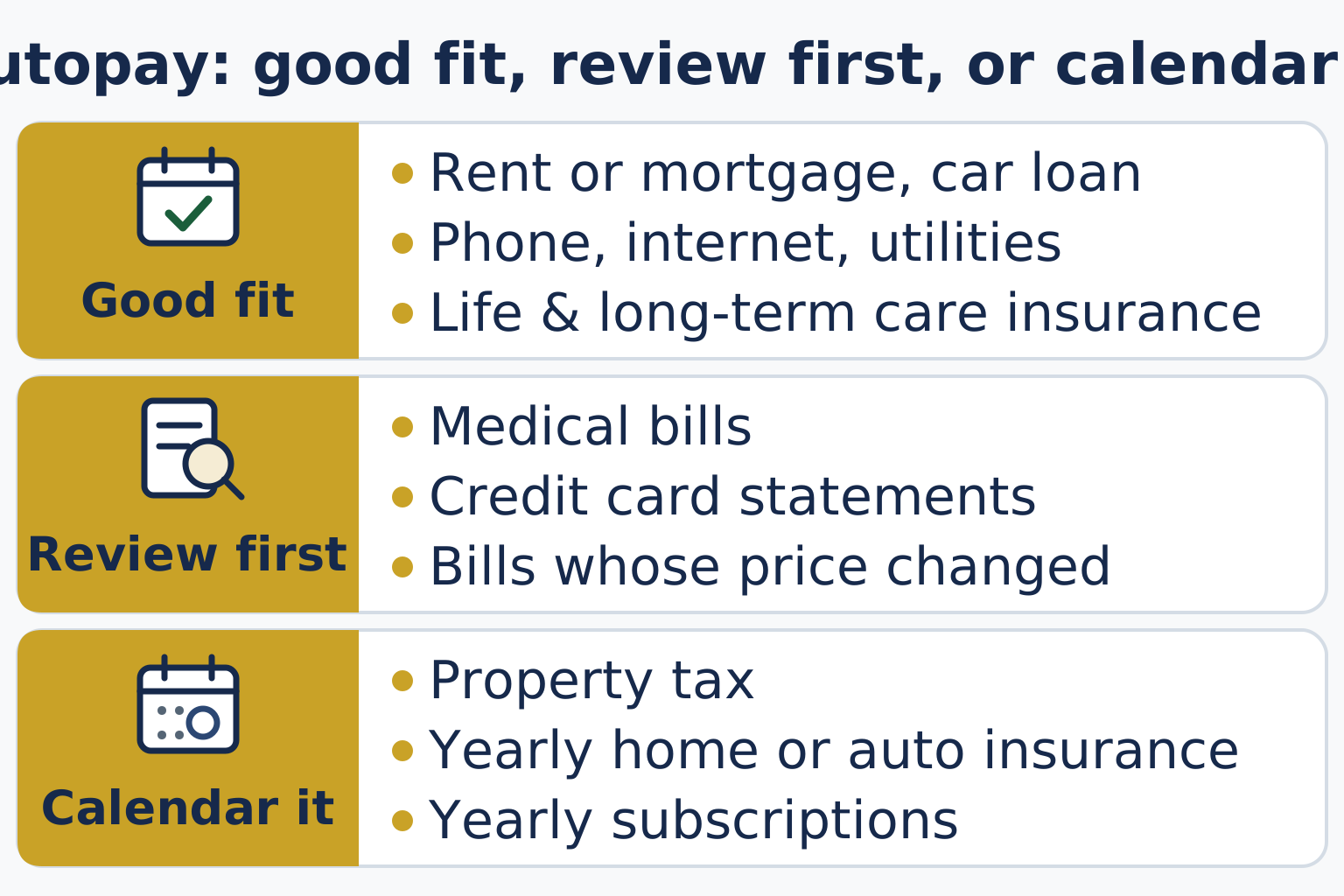
| Good fit for autopay (steady amounts) | Review before paying (amounts change) | Calendar it (once or twice a year) |
|---|---|---|
| Mortgage or rent | Medical bills from doctors and hospitals | Property tax |
| Car loan | Credit card statements | Annual home or auto insurance premiums |
| Phone and internet | Anything whose price has changed | Yearly subscriptions and memberships |
| Electric, gas and water | ||
| Life and long-term care insurance premiums |
Insurance premiums deserve a special mention. AARP's autopay guide notes that a missed life or long-term care insurance payment could end the policy, which makes those premiums strong candidates for autopay. The same guide suggests starting with one or two bills and adding more over time.
Bills in the middle column still get paid. Someone just reads them first. Medical bills in particular can contain errors, and a credit card statement is where an unfamiliar charge shows up.
Property taxes don't fit a monthly autopay. In North Carolina, property taxes are due September 1, and the state's law says they are payable at face amount if paid before January 6 following the due date. In York County, South Carolina, taxes become due on September 30 and can be paid without penalty through January 15 of the following year. Put those dates on the calendar. If your parent has a mortgage, ask the lender whether an escrow account already pays the tax.
Medicare premiums may already be automatic. Medicare says most people have their Part B premium deducted automatically from their Social Security benefit payment. Others get a premium bill from Medicare.
If your parent gets that bill, Medicare Easy Pay is "a free way to set up recurring payments to pay your Medicare premiums." The payment is taken on the 20th of the month (or the next business day). Your parent can sign up through their Medicare account or with form SF5510. It can take up to 6 to 8 weeks to start, so keep paying the bill until it does.
Bank bill pay or company autopay: what's the difference?
"Autopay" can mean three different setups, and each one is watched a little differently.
- Bank bill pay. Your parent schedules the payment inside their own bank's online banking, and the bank sends it. Every payment starts from one place, where it can be seen and changed.
- Company autopay (automatic debit). Your parent gives the company permission to take the payment from their bank account. The company starts each payment, within what your parent authorized.
- Card autopay. The bill is charged to a credit card, and the card is paid separately. It gathers bills in one place, but now there are two accounts to watch.
AARP notes that some advisers prefer setting up automatic payments through the bank. Many people find payments easier to watch when they all start from one place.
Your parent's rights with company autopay. The Consumer Financial Protection Bureau (CFPB) explains that your parent can stop a company from taking automatic payments from their account. The steps, in plain terms:
- Tell the company your parent is taking away their permission for the payments.
- Give the bank a stop-payment order at least three business days before the payment is scheduled. That timing comes from the CFPB's guide to automatic debit payments and from the federal rule itself, Regulation E, which says "at least three business days before the scheduled date of the transfer."
- Write down the date of each request.
A few more points from the CFPB's autopay page: banks "generally charge fees for stop payment orders," and stopping an automatic loan payment does not end what is owed, so the bill still has to be paid another way. If a payment goes through after your parent took back permission, tell the bank right away.
When the amount of a company autopay will change, Regulation E requires notice "at least 10 days before the scheduled date of transfer." So a change in the amount should come with notice first.
How do you set up autopay with your parent?
Once you have talked it through, the setup itself is short. Do it together, with your parent at the keyboard or on the phone.
- Sit down with the bill list and the last couple of statements, so you can see each bill's usual amount and due date.
- Start with one or two steady bills. AARP's autopay guide suggests starting small and adding more over time.
- Choose how each one is paid: through the bank's bill pay, or by the company's own autopay (see above).
- Pick a payment date that falls after Social Security or a pension arrives each month.
- Ask the bank which alerts it offers, and turn on the ones your parent wants (more on alerts below).
- Watch for the first automatic payment. Check the next statement, or the company's online account, to see that it posted for the right amount.
- Add each autopay to the bill list, with its date and the account it comes from.
What happens if there isn't enough money in the account?
This risk is easy to overlook. The CFPB says that "banks are allowed to charge overdraft fees for checks and recurring electronic payments, even if you did not opt in." The opt-in choice your parent may remember covers only ATM withdrawals and one-time debit card purchases.
If the bank declines the payment instead, the CFPB notes there may be a non-sufficient funds fee from the bank, and "declined payments may trigger a returned item fee from the merchant."
A few practical steps help:
- Line up autopay dates with the days Social Security or a pension arrives.
- Keep a cushion in the account above the month's autopays.
- Ask the bank about a low-balance alert.
- Ask the bank what overdraft options the account has.
How do you keep an eye on autopay without taking over?
Autopay works when someone looks at the statement every month. Here is a short review you and your parent can do together, at the kitchen table or on a call.
- Open the statement together. If your parent has added you to their e-statements, you can each look at your own copy.
- Check off each expected autopay against your parent's list of bills. Our guide to managing bills for aging parents shows how to build that list.
- Circle anything new, larger than usual, or for something your parent no longer uses.
- Check the balance will cover next month's autopays.
- Note anything to call about. Your parent makes the call, or puts you on the line.
- Twice a year, compare every autopay with the list and cancel what isn't needed, using the stop-payment steps above.
Alerts to ask the bank about. Banks differ, so ask which alerts your parent's bank offers. Common ones include a low balance, any withdrawal over an amount your parent sets, a payment posted, and a new payee added. AARP describes an adviser who set up text alerts so a parent could confirm that payments had posted. Alerts can go to your parent and, with their permission, to you as well.
If you are helping from a distance, our page for adult children has more on sharing the work with your parent. If you live away from a parent in Charlotte, see helping with a Charlotte parent's bills from out of town.
Some families would like someone else to run this monthly review. Granitefield's bill payment service for seniors tracks the bills, confirms that each payment went through, checks anything new with your parent first, and sends a monthly record of what was paid.
Frequently Asked Questions
Does autopay mean we can stop checking the bills?
No. Autopay takes care of remembering to pay, but it doesn't check a bill for mistakes or fraud. AARP's autopay guide still advises reviewing the monthly statements. A short monthly review and a few bank alerts are what make autopay work.
How do I stop an autopay my parent no longer wants?
Your parent tells the company they are taking back permission, then gives the bank a stop-payment order at least three business days before the next payment, as the CFPB and Regulation E describe. The bank may charge a fee, and any amount still owed has to be paid another way, according to the CFPB.
Can autopay cause an overdraft?
Yes. The CFPB says banks can charge overdraft fees on recurring electronic payments even if your parent never opted in to overdraft coverage. Matching autopay dates to deposit dates and setting a low-balance alert both help.
Should property taxes go on autopay?
They come once a year, so a monthly autopay won't cover them. In North Carolina they are due September 1 and payable at face amount before January 6; in York County, South Carolina, they are due September 30 and payable without penalty through January 15. A calendar reminder works, and if there is a mortgage, ask whether escrow already pays the tax.
Can Medicare premiums be paid automatically?
Most people's Part B premium is already deducted from their Social Security benefit. If your parent gets a bill from Medicare, Medicare Easy Pay is free and takes the payment on the 20th of the month (or the next business day).
Should I put my name on my parent's account to manage autopay?
Not without advice first. There are several ways to get access to a parent's account, such as a joint account or a financial power of attorney, and they have different legal effects. An elder law attorney can explain the difference between being a joint owner and the other options.
Want help with the bills and paperwork? Talk through what you need, and what permission is in place, with Granitefield Financial.